
Software Engineer, Borderpass (2025-26)
Overview
Borderpass is a legaltech startup that streamlines immigration pathways for individuals coming to Canada. I built out a lot of major AI integrations, document processing pipelines, and workflow automations that signifigantly sped up application processes for our legal team as well as 40,000+ customers.
My key contributions
- Architected an end-to-end AI Job Search Tool which generates filters based on vector indexed user resumes to perform a web crawl of popular job sites, returning a personalized list of job postings in seconds.
- Harnessed cutting-edge AI vision models like Google Gemini to intelligently extract and validate data from user documents, assembling a real-time profile of each applicant and capturing in PostgreSQL / Redshift.
- Developed and deployed headless browser agents on ECS for automating complex web tasks, resulting in hundreds of hours saved for the operations team weekly and boosting monthly application volume by 2.8x.
- Orchestrated and maintained critical cloud resources such as AWS Lambda functions and AWS Fargate background workers powering the core platform including PDF/ZIP merging/compression, image preprocessing, web scraping, and legal document generation significantly boosting system reliability and workflow efficiency.
Personalized AI Job Search Tool
I led the development of an AI job search tool which was used by thousands of users on the platform and helped incoming workers land jobs relevant to their field. The system leverages document context (stored as vector embeddings) to generate personalized search filters for a given job seeker. It then uses Scrapy (a Python-based web crawler) to crawl popular job sites, returning a custom list of job postings in seconds.
Architecture
The crawler is hosted on an AWS Lambda split into staging and prod environments.
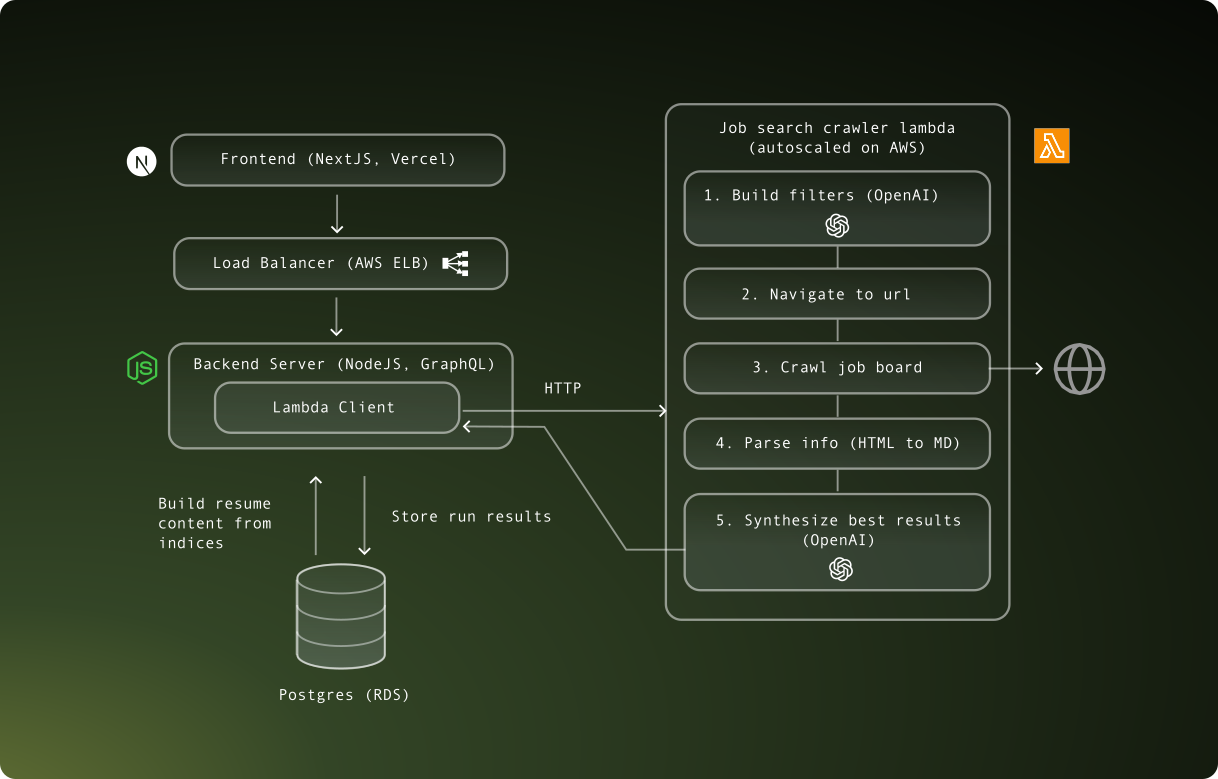
- The user triggers a run from the app frontend via a REST API call to the server, which is then queued for processing by the crawler Lambda. The operation is asynchronous, so the user is not blocked. The response is polled every second. An optional description that the user enters is passed in the request. The selected resume content is also passed.
{
  "resumeContent": "ResumeContentSection[]",
  "description": "string"
}- The Lambda handler receives the request and starts by Generating Filters using GPT-4o. These are relevant to the user info given in their description and resume.
{
  "keywords": ["Dancer", "Singer", "Musician"],
  "province": "ON",
  "employment_conditions": ["Day", "Night", "Weekend"],
  "hours_of_work": ["Full time"],
  "salary": "60,000+",
  "work_location": ["On site", "Hybrid"],
  "education_or_training": ["College or apprenticeship"],
  "years_of_experience": ["1 year to less than 3 years"]
}- Construct Job Bank URL: To kick off the search, the URL is customized with specific query parameters.
https://www.jobbank.gc.ca/jobsearch/job_search_advanced.xhtml?fn21=21211&fper=F&fwcl=D&term=data+scientist&sort=M&fprov=ON&fskl=%C2%AC100000&fskl=%C2%AC100001&fskl=%C2%AC15141
fper=Ffilters by full-time jobs only.fwcl=Dfilters by salary range.term=data+scientistfilters by keyword search.fprov=ONfilters by province.fskl=...filters by work locations like onsite, remote, hybrid.
- View and extract results: The scraper navigates to the URL generated with filter query params. It parses HTML and finds target postings. For each result, it opens the detail page and extracts the job details card.
- Follow links: If the posting is from an external source such as Indeed or LinkedIn, the crawler follows that link and extracts more details.
- Store results: Each job posting is stored in a normalized format.
{
  "job_title": "Lead Data Scientist, AI and Technology Strategy",
  "employer_name": "RBC Dominion Securities",
  "job_description": "...",
  "location": "Ottawa, ON",
  "work_setting": "On-site",
  "salary": "79,000 to 119,000 annually",
  "work_type": "Permanent Employment Full-time",
  "start_date": "As soon as possible",
  "job_source": "Indeed.com",
  "link": "https://ca.indeed.com/viewjob?jk=2ba329de2f81eb23",
  "is_external": true
}- Filter data: Feed the results into GPT-4o and return the top K results judged against the user’s description and resume.
- Display results: Results are displayed in the frontend after polling returns complete.
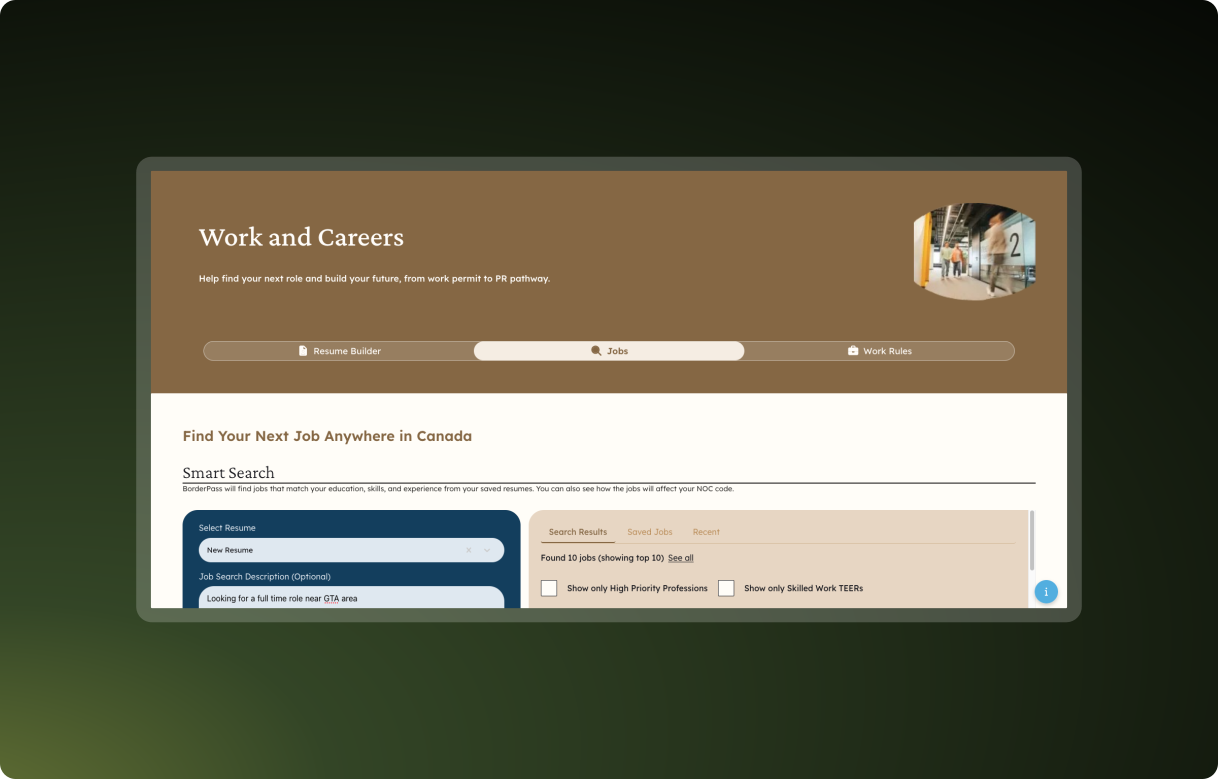
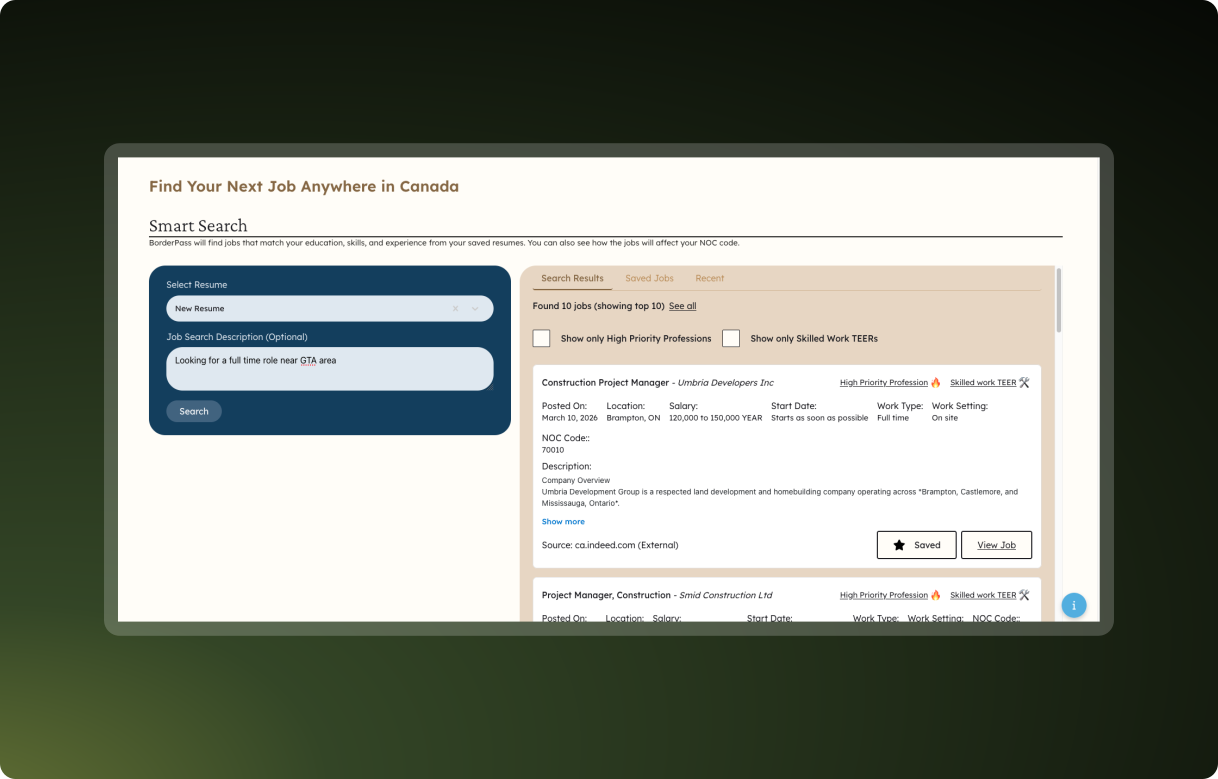
Users can also save favorite results and view search history.
Workflow Automation
An ongoing project I contributed to was a headless browser automation tool built with Python, Puppeteer, and Google Gemini deployed on ECS. It mixes traditional browser-based automation with improvisational capabilities of LLMs to perform repetitive online form submissions and reduce manual labor.
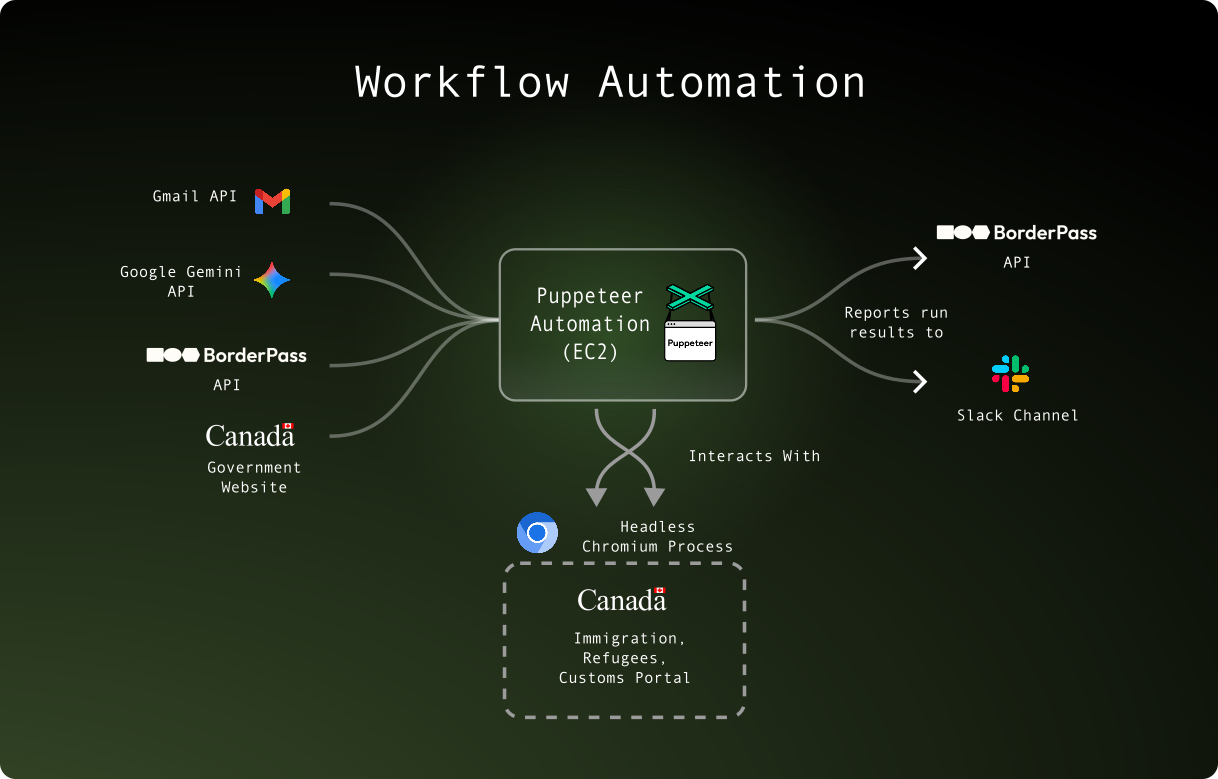
The main challenge was balancing several moving pieces. The automation must follow a strict sequence of steps that are logged and reported by the server and integrations such as Slack. It can read and parse emails, upload and download files, and perform complex form submissions in a headless browser. Bot detection, race conditions (reading from multiple sources such as emails), and exponential backoff were other aspects involved.
Integration with Internal Systems
A core architectural problem with the automation was that it was split from the main application codebase. This meant that complex business logic needed to be translated from TypeScript to Python when adding decision flows.
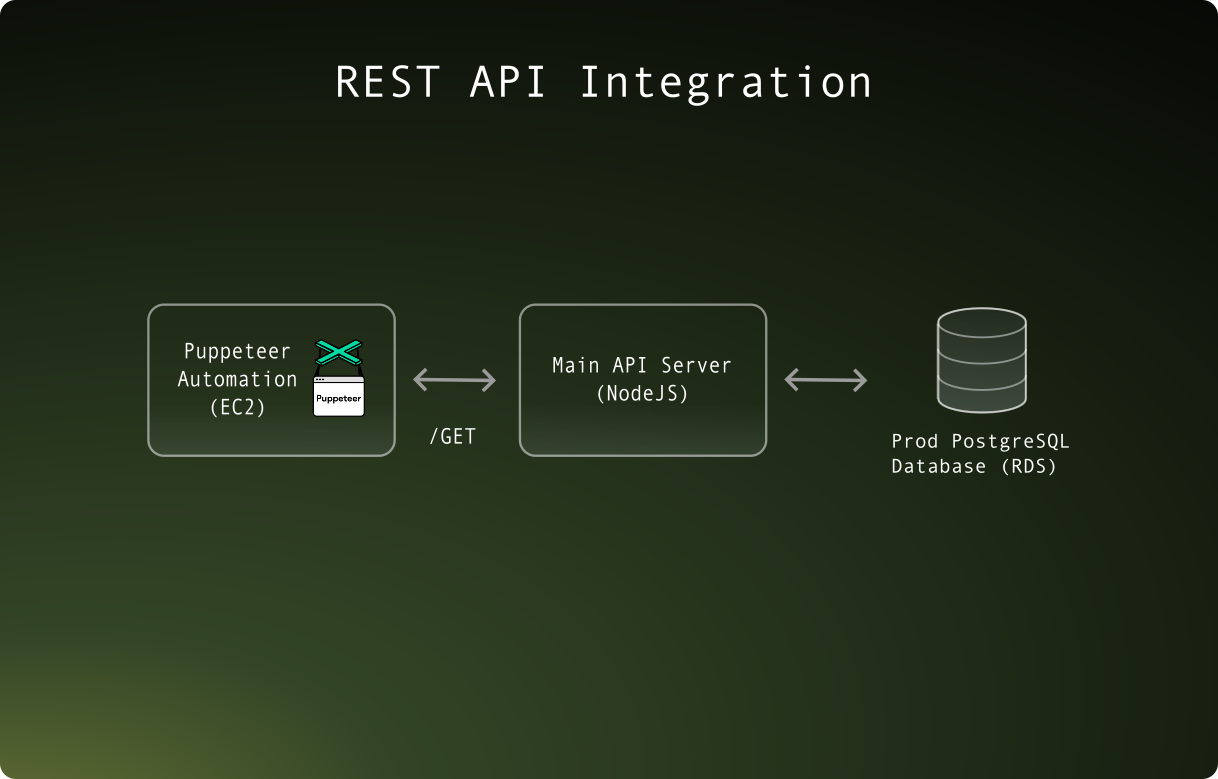
A major refactor I did was introducing a REST API interface allowing the automation to communicate with the main API server within our VPC, which offloaded business logic decisions to the existing backend. This significantly improved maintainability since it prevented code duplication across two codebases (in different languages too) and reduced the risk of business-logic drift.
Deployment
The automation is containerized and configured to run on ECS workers using AWS Fargate. Runs are ephermeral and are scheduled on AWS Event Bridge.
Improvements
I made several reliability enhancements such as resolving bot detection issues, improving memory usage, adding retry logic, exponential backoff, and handling concurrency/race condition related issues.